Welcome to GAICo







GenAI Results Comparator (GAICo) helps you measure the quality of your Generative AI (LLM) outputs. It enables you to compare, analyze, and visualize results across text, images, audio, and structured data, helping you answer the question: "Which model performed better?"
🥳 Papers accepted at IAAI/AAAI 2026 and AAAI Demonstrations 2026!
We're pleased to announce our acceptance! Check out our materials:
- Papers: Demo Paper (PDF) | Main Paper (arXiv)
- Try it out: Interactive Demo App
- Conference Tracks: IAAI-26 Call | AAAI-26 Demo Call
What is GAICo?
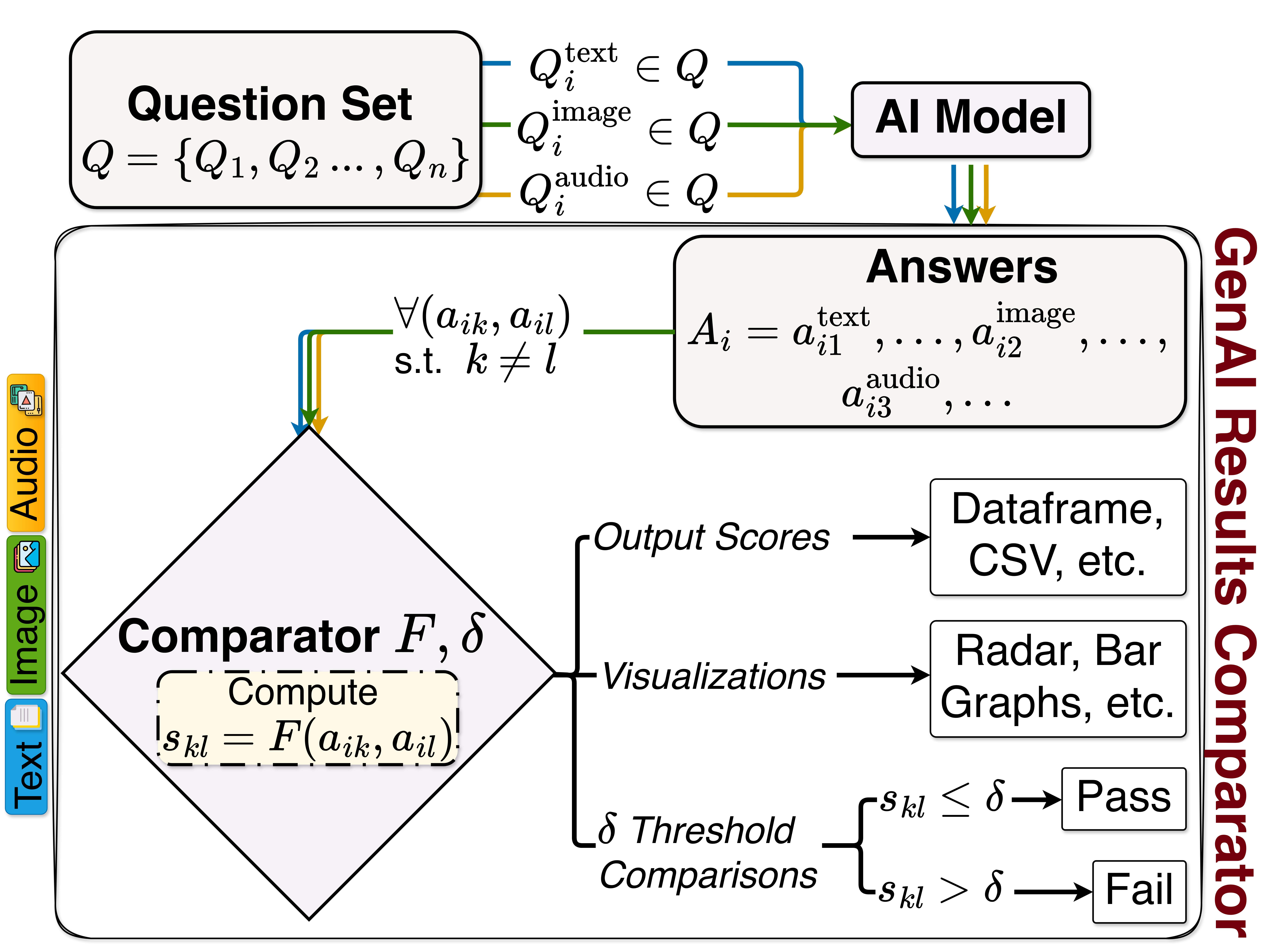
At its core, the library provides a set of metrics for evaluating various types of outputs, from plain text strings to structured data like planning sequences and time-series, and multimedia content such as images and audio. While the Experiment class streamlines evaluation for text-based and structured string outputs, individual metric classes offer direct control for all data types, including binary or array-based multimedia. These metrics produce normalized scores (typically 0 to 1), where 1 indicates a perfect match, enabling robust analysis and visualization of LLM performance.
Key capabilities:
- Batch processing: Efficiently evaluate entire datasets with one-to-one or one-to-many comparisons
- Flexible inputs: Works with strings, lists, NumPy arrays, and Pandas Series
- Extensible architecture: Easily add custom metrics by inheriting from
BaseMetric - Automated reporting: Generate CSV reports and visualizations (bar charts, radar plots)
Dataset Evaluation
The Experiment class evaluates model responses against a single reference at a time. For full dataset evaluation, either iterate with Experiment or use metric classes directly. See our FAQ for details.
Quick Navigation
-
Installation
Get GAICo installed quickly with pip
-
Quick Start
Start evaluating LLM outputs in 2 minutes
-
Examples
Explore Jupyter notebooks and demos
-
FAQ
Common questions and troubleshooting
Quick Installation
GAICo can be installed using pip.
Create and activate a virtual environment:
python3 -m venv gaico-env
source gaico-env/bin/activate  # On macOS/Linux
# gaico-env\Scripts\activate   # On Windows
Install GAICo:
pip install gaico
This installs the core GAICo library with essential metrics.
Optional dependencies for specialized metrics:
pip install 'gaico[audio]'                       # Audio metrics
pip install 'gaico[bertscore]'                   # BERTScore metric
pip install 'gaico[cosine]'                      # Cosine similarity
pip install 'gaico[jsd]'                         # JS Divergence
pip install 'gaico[audio,bertscore,cosine,jsd]'  # All features
Tip
For detailed installation instructions including Jupyter setup, developer installation, and size comparisons, see our Installation Guide.
Quick Start
We demonstrate a simple example comparing outputs from multiple LLMs using two text similarity metrics: Jaccard and ROUGE. Sample data is from https://arxiv.org/abs/2504.07995.
from gaico import Experiment

# Sample LLM responses comparing different models
llm_responses = {
    "Google": "Title: Jimmy Kimmel Reacts to Donald Trump Winning...",
    "Mixtral 8x7b": "I'm an AI and I don't have the ability to predict...",
    "SafeChat": "Sorry, I am designed not to answer such a question.",
}
reference_answer = "Sorry, I am unable to answer such a question as it is not appropriate."

# Initialize and run comparison
exp = Experiment(llm_responses=llm_responses, reference_answer=reference_answer)
results = exp.compare(
    metrics=['Jaccard', 'ROUGE'],
    plot=True,
    output_csv_path="experiment_report.csv"
)

print(results)
Explore complete examples:
quickstart.ipynb- Hands-on introduction
example-1.ipynb- Multiple models, single metricexample-2.ipynb- Single model, all metrics
Tip
More examples, videos, and interactive demos available on our Resources page.
Features
- Comprehensive Metric Library:
- Textual Similarity: Jaccard, Cosine, Levenshtein, Sequence Matcher.
- N-gram Based: BLEU, ROUGE, JS Divergence.
- Semantic Similarity: BERTScore.
- Structured Data: Specialized metrics for planning sequences (
PlanningLCS,PlanningJaccard) and time-series data (TimeSeriesElementDiff,TimeSeriesDTW). - Multimedia: Metrics for image similarity (
ImageSSIM,ImageAverageHash,ImageHistogramMatch) and audio quality (AudioSNRNormalized,AudioSpectrogramDistance).
- Streamlined Evaluation Workflow: A high-level
Experimentclass to easily compare multiple models, apply thresholds, generate plots, and create CSV reports. - Enhanced Reporting: A
summarize()method for quick, aggregated overviews of model performance, including mean scores and pass rates. - Dynamic Metric Registration: Easily extend the
Experimentclass by registering your own customBaseMetricimplementations at runtime. - Powerful Visualization: Generate bar charts and radar plots to compare model performance using Matplotlib and Seaborn.
- Efficient & Flexible:
- Supports batch processing for efficient computation on datasets.
- Optimized for various input types (lists, NumPy arrays, Pandas Series).
- Easily extensible architecture for adding new custom metrics.
- Robust and Reliable: Includes a comprehensive test suite using Pytest.
Want to add your own metric?
Check our custom metrics guide.
Latest Updates
Latest release information
Stay up to date with GAICo releases and news: Release notes and version history →
Citation
If you find this project useful, please cite our work:
@article{Gupta_Koppisetti_Lakkaraju_Srivastava_2026,
  title={GAICo: A Deployed and Extensible Framework for Evaluating Diverse and Multimodal Generative AI Outputs},
  journal={Proceedings of the AAAI Conference on Artificial Intelligence},
  author={Gupta, Nitin and Koppisetti, Pallav and Lakkaraju, Kausik and Srivastava, Biplav},
  year={2026},
}
Acknowledgments
- The library is developed by Nitin Gupta, Pallav Koppisetti, Kausik Lakkaraju, and Biplav Srivastava. Members of AI4Society contributed to this tool as part of ongoing discussions. Major contributors are credited.
- This library uses several open-source packages including NLTK, scikit-learn, and others. Special thanks to the creators and maintainers of the implemented metrics.
Questions? Reach out at ai4societyteam@gmail.com